[Gianluca
Gorni's home page]
TeX page
Corso LaTeX 2010
Il corso è da 1 credito. È indirizzato agli studenti di Matematica, ma può essere utile a qualunque studente di facoltà scientifiche, specialmente in vista della tesi di laurea. L'esame consiste nella discussione di un progettino: 2 o 3 o più pagine di senso compiuto, a scelta dello studente, scritte in LaTeX, e contenenti gli elementi principali (intestazione, sezionamento, formule, rimandi ecc.). Il progettino va presentato o in versione cartacea o elettronica, in entrambi i casi con sia il testo sorgente che il typeset . Il risultato dell'esame è approvato o non approvato, senza voto.
I lucidi del corso sono questi. C'è anche una versione per stampa. I lucidi sono stati pensati per lo schermo, comunque la versione per stampa dovrebbe far risparmiare un po' di carta.
The main packages I used to write the slides are TeXPower
and Marslides.
Introduction
Question: What is TeX???
Answer: it is not a cartoon character
(that one is Tex
Willer, with lower-case x). It is a text and page layout system,
specially designed for mathematical and scientific printing. Browse
the .pdf
files in this site to see some of TeX's
capabilities.
Question: How shall I pronounce
"TeX"?
Answer: The official pronunciation is
tricky for speakers of many languages. You will be forgiven if you
just say "TEK", as in English "TECHnology". Please do
not say "teks" as in (English) "Texas"!
Some pages describing the advantages of TeX
over word-processors: Allin
Cottrell, Skylar
Thompson, wiki.
Also look at the TeX
entry in the Free
online dictionary of computing.
Have a look at The
PracTeX Journal, the online journal of the TeX Users Group.
LaTeX
reference on-line
(in Italian when available)
- L'Arte di Scrivere con LaTeX di Lorenzo Pantieri.
- Mathematical writing di Donald E. Knuth, Tracy Larrabee e Paul M. Roberts: questioni di stile di scrittura matematica più che strettamente di LaTeX.
- Marc Baudoin's "Impara
LaTeX! (... e mettilo da parte)", a handbook of LaTeX in
87 pages, translated into Italian by Alessandro Cannarsi,
and converted to .pdf
format (466K) by yours truly.
- Tobias
Oetiker's (and others') "Una
(mica tanto) breve introduzione a LaTeX2e" (Italian
translation by the Gilda/Guild
group, 109 pages) in .pdf
format (1093K).
- Manuale
utente per il pacchetto amsmath (pdf, 354K),
Uso del pacchetto
amsthm (pdf, 119K) and amsmath
FAQ (text, 14K), from the Americal
Mathematical Society (Italian translation by the Gilda/Guild
group)
- LaTeX para las humanidades (pdf),
Este documento tiene como objetivo ofrecer a todos los autores relacionados con cualquier campo de las Humanidades una introducción práctica, elemental y amena al uso de LaTeX.
- Peter Flynn's "Formatting
Information, A beginner's introduction to typesetting with
LaTeX".
- "PGI -
Piccole Guide d'Informatica" by Luigi
Carusillo.
- "LaTeX Community", un forum in rete per gli utenti di LaTeX.
- "LaTeX
for Word Processors Users" by Guido
Gonzato.
- A
comprehensive LaTeX symbol list (with 2590 symbols!).
- Well..., my own Introduzione
al LaTeX.
- Consigli su Come (non) si scrive la tesi, di Stefano Mizzaro.
- Piet van Oostrum's Layout
di pagina in LaTeX (users' guide to the fancyhydr
package; Italian translation by the Gilda/Guild
group) in .pdf
format (388K).
- TeX by
Topic, a whole book by Victor
Eijkhout, is available on-line for free.
- George
Grätzer's "Math
into LaTeX. An Introduction to LaTeX and AMS--LaTeX" About
100 pages of this book are available on line in PostScript,
pdf
and dvi formats.
- A
gentle introduction to LaTeX by Michael Doob.
- Example files from the book LaTeX
Line by Line, by Antoni Diller.
- "Text
Processing using LaTeX" from the University of Cambridge.
- "Beginner's
LaTeX" from Virginia
Commonwealth University Computer Center.
- Gettin
Started with LaTeX, by David
Wilkins.
- PDF
LaTeX by example, by C.T.J. Dodson.
- An
Introduction to using LaTeX2e, mostly about system setup, not
about writing documents.
- A listing
of on-line TeX help from Trento University.
- A listing
of on-line TeX help from Trieste University.
- Advice on how to write a LaTeX thesis
in Italian from Trieste University.
- (La)TeX
Navigator.
- "Technical
Documents with LaTeX", a course by Prof.
Gary L. Gray and and Francesco
Costanzo at Penn
State University.
- Novice
level tutorial for LaTeX ,by the Indian
TeX Users Group.
- LaTeX
Help from Emory
University.
- An
introductory course to LaTeX in German by Stephan
Lehmke.
- "Scrivere
con LaTeX" by Riccardo Murri.
- Notes
on TeX for Linux.
- A guide
to LaTeX from INFN.
- A TeXnical explanation on how
to use True Type fonts with TeX.
- Practical
LaTeX guide from Helsinki Dept. of Physics.
- A list of (mostly) LaTeX tools to make overhead
slide or computer screen presentations. Look also at this
CalTeX
talk.
- Outils
de rédaction scientifique from Univ. of Nantes.
- Apprendre
LATEX en 6 leçons de 2 minutes.
- Google
LaTeX page.
- To learn how to make beautiful illustrations: A
MetaPost manual, and a PostScript
manual.
- Troubleshooting
graphic files for inclusion into LaTeX.
- Google's
comp.text.tex group.
A sample math thesis
template
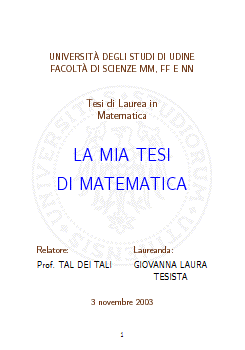
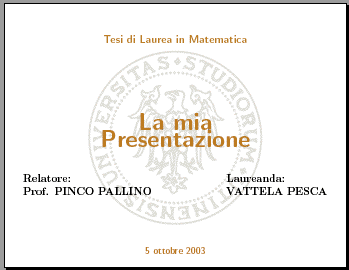
Thesis front page

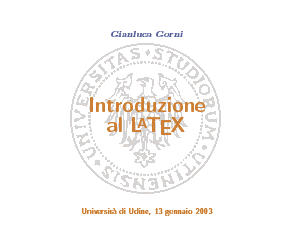
Transparencies presentation (in color)

PDF slideshow presentation
Here is a zip archive (1.1MB, last
updated on 2009-11-27) with style files and sample templates and
outputs for three kinds of documents:
- The actual Thesis, meant primarily for printing;
- Transparencies presentation of the thesis;
- pdf slideshow presentation, meant for projection from a
computer.
The example is for a Math thesis, but the style file allows thesis
in any subject. Unzip the archive and then compile the master files (tesi.tex, lucidiTesi.tex, presentazione.tex).
TeX FAQ

The special font for the number sets are loaded with
- \usepackage{amsfonts}
\newcommand{\N}{\mathbb{N}}
\newcommand{\Z}{\mathbb{Z}}
\newcommand{\Q}{\mathbb{Q}}
\newcommand{\R}{\mathbb{R}}
\newcommand{\C}{\mathbb{C}}

This special calligraphic font is called RSFS (Ralph Smith's
Formal Font). It is available from CTAN
(search for the "rsfs" string). A ready-made pack for Textures on
the Macintosh is here.
With the LaTeX package mathrsfs
you can call the rsfs font with \mathscr{A}. With
PlainTeX you get the same effect with the following
definitions:
- \font\tenrsfs=rsfs10
\font\sevenrsfs=rsfs7
\font\fiversfs=rsfs5
\newfam\rsfsfam
\textfont\rsfsfam=\tenrsfs
\scriptfont\rsfsfam=\sevenrsfs
\scriptscriptfont\rsfsfam=\fiversfs
\def\mathscr#1{{\fam\rsfsfam\relax#1}}
- To write LaTeX documents in Italian with Miktex you
will fist need (just once, not every time you typeset) to
Then make your document preambles like this (on Windows
and Unix):
\documentstyle[italian,...]{...}
\usepackage{babel}
\usepackage[latin1]{inputenc}
...

To make it comfortable to type in Italian when using LaTeX
load the inputenc package like this:
- \usepackage[latin1]{inputenc} for
use with Windows or Unix,
- \usepackage[applemac]{inputenc} for
use with Macintosh.
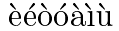
A discussion on the correct use of the accents on the letters
"i" and "u" in Italian spelling can be found here.
- Headers and footers: sometimes the title of a chapter or of a
section is too long to fit into the page header. Then you can
declare a shortened title with \chaptermark and
\sectionmark:
- \chapter{full title}
\chaptermark{title for header}
\sectionmark{title for
header}
\section{full title}
\sectionmark{title for
header}
Note that \sectionmark is repeated twice,
before AND after \section. This is awkward, but
it's not my fault. Read here
for more explanation.

TeX on personal
computers
For Windows: (see also this TeX
for Windows page and this
other one, and one
more)
- MikTeX
(freeware); see these installation
tips in Italian;
- ProTeXt,
a package containing MikTeX together with editors and other
stuff.
- Windows text editors specially suited for TeX (see a
comprehensive list here):
- TeXnicCenter
(free) (see this tools
page),
- WinShell
(free).
- Texmaker
(free).
- LaTeXEdit
(a limited version is free, the full version is
charityware);
- WinTeX
2000 (shareware, 39.97 euro),
- WinEdt
(shareware, $30 for students). Do not confuse WinEdt with
WinEdit
(commercial, 89$), which can also be used with (La)TeX,
anyway.
- LaTeX
editor.
- Chek out ProFont,
a free programmer's font.
- Instructions
on how to install TeX for Windows with emacs as editor,
by Claus Dethlefsen.
- Graphic converters: eps2pdf,
EMPTOEPS,
WMF2EPS.
- PCTeX
(commercial); you can download a demo.
- I understand that TeXaide
is a free equation editor for Windows that produces TeX code to
paste into your TeX documents.
- TexPoint,
a LaTeX add-in for PowerPoint.
For Macintosh
(more info here):
- TexShop,
and iTeXMac,
two free TeX editors for MacOS X.
- i-Installer,
an internet-aware free TeX installer and updater for
MacOS X.
- OzTeX
(shareware);
- CMacTeX
(shareware; carbonized for MacOS X)
Some notes on TeX
for Linux.
A more comprehensive list is here.
More TeX-related
links here.
See also the Gilda/Guild
group's page. There is also the web site of the Italian
TeX Users Group.
Look here
for how to combine TeX with pdf.
I can lend my TeX CD-ROM for easy installation of
LaTeX to interested students. The disk is quite new (December
2004).
There is a package to typset music
with TeX! You'll find some examples at Maurizio
Candilera's site. More links at the Werner
Icking Music Archive.